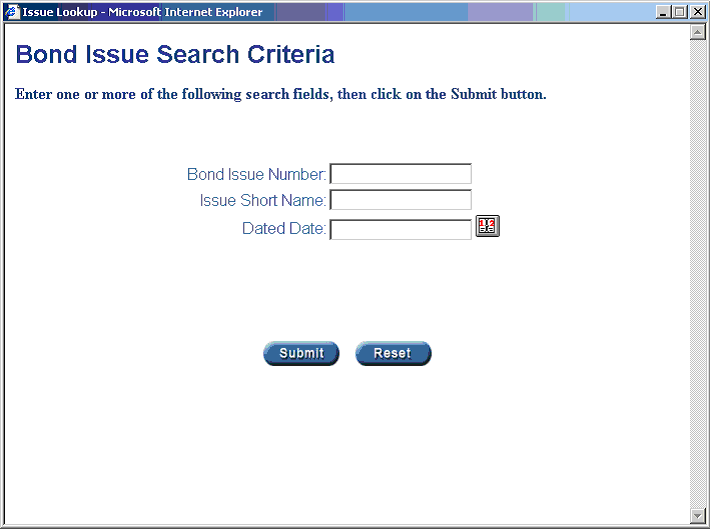
In certain functions on the system, you will be asked to enter a bond An interest-bearing security that obligates the issuer to pay a specified amount of interest for a specified time, usually several years, and then repay the bondholder the face amount of the bond. Bonds issued by corporations are backed by corporate assets in case of default, the bondholders have a legal claim on those assets. issue number at which time you will be brought to the bond issue number lookup screen. Below are listed the steps in entering the information into this screen so you can bring up the correct bond issue number. If you know the full bond issue number, then enter this number at the bond issue number prompt and select the submit button, otherwise read the information below to search for the correct bond issue number. All of the information below is optional. If you leave all of these boxes blank, the system will bring up every single bond issue number that has been entered in the system.
1. On the box search page, enter the bond issue number and select the submit button and this should take you directly to the correct bond issue number if it exists. You will get a “No Matches Found” message if you do not enter a valid bond issue number.
2. Select the search button to enter the search or lookup mode.
3. A screen will now appear where you can enter the bond issue number, the issue shorthand code, or the dated date The date at which interest begins to accrue on a fixed-income security. Investors who purchase a fixed-income security between interest payment dates must also pay the seller or issuer any interest that has accrued from the dated date to the purchase date, or settlement date, in addition to the face value. of the issue.
a. If you choose the bond issue number lookup, enter part or all of the bond issue number that you are searching for. (Example: if you are looking for bond issue 159, you could enter 1 or 15 or 159).
b. If you choose the issue short name, enter the alphabetic lookup code. (This is not case sensitive so it will search for capital letters and small letters as well). Example: If you are searching for one the issues where the short name starts will MILL, you could enter either M, I, L, MI, MIL, or MILL. The system will search for any issue short names that have these alpha characters in them. You can also search on numbers as well. If the issue short name is MILL98, you can enter 98 to see all the issue short names with 98 in them, or you could enter L9 to see all the issue short names that have L9 in them.
c. If you choose the dated date you must enter a valid full date into the box provided or you can select the calendar icon next to this box to lookup the dated date. You must enter the full 4 digit year. The system will automatically put slashes next to the day, month, and year.
4. Select the submit button to enter your selection.
5. Select the reset button to wipe you your data and enter new search data.
6. If no matches are found you will get a message box that will appear and say “No Matches Found”. Select the OK button to go back to the search page to enter in new data to search for the bond issue.
7. If matches are found, then you will see a new page with the headers Issue #, Short Name, Record Date The day on which a transfer agent closes its holder records for the purpose of identifying the recipients of a forthcoming distribution. , and Dated Date on it. Select the highlighted bond issue number to select the bond issue number that you want.